
Update your RPC provider
Before modifying smart contract logic or wallet interfaces, ensure your node infrastructure supports the Pectra upgrade and EIP-7702 transaction types. Most major RPC providers enabled EIP-7702 by default during the Pectra upgrade. Verify your provider's changelog to confirm support.
If you are running a self-hosted node, update your client software to the latest Pectra-compatible version. For example, if you use Geth, ensure you are on version 1.14.0 or later. For Besu, update to the latest release candidate or stable build that includes Pectra support. Without this update, your node will reject EIP-7702 transactions as invalid.
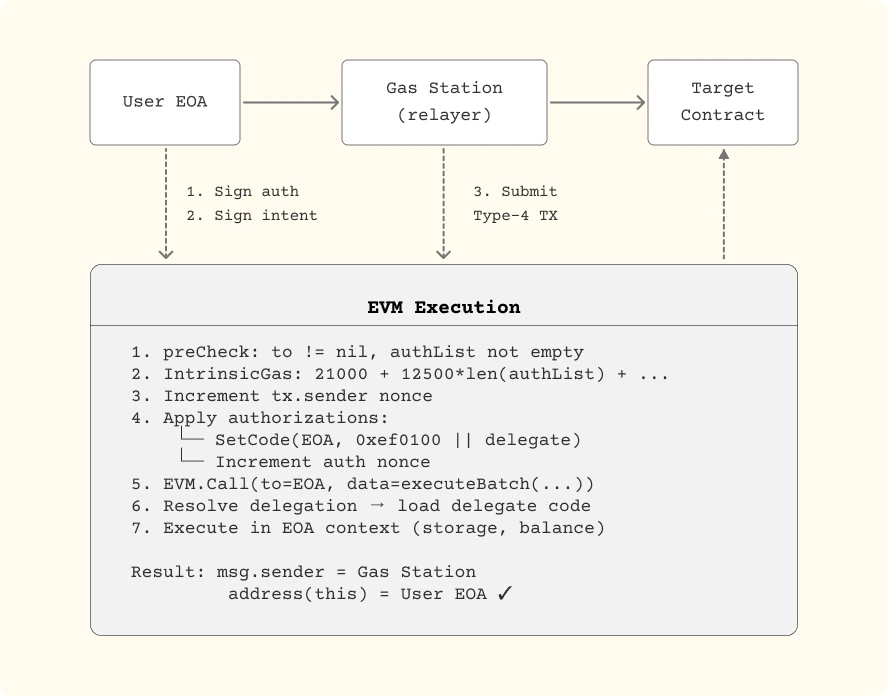
After updating, verify the RPC endpoint responds correctly to EIP-7702-specific calls. You can test this by sending a small test transaction that includes a type=4 header with an authorizationList. If the transaction is included in a block, your RPC provider is ready for EIP-7702 integration.
Handle EOA delegation signatures
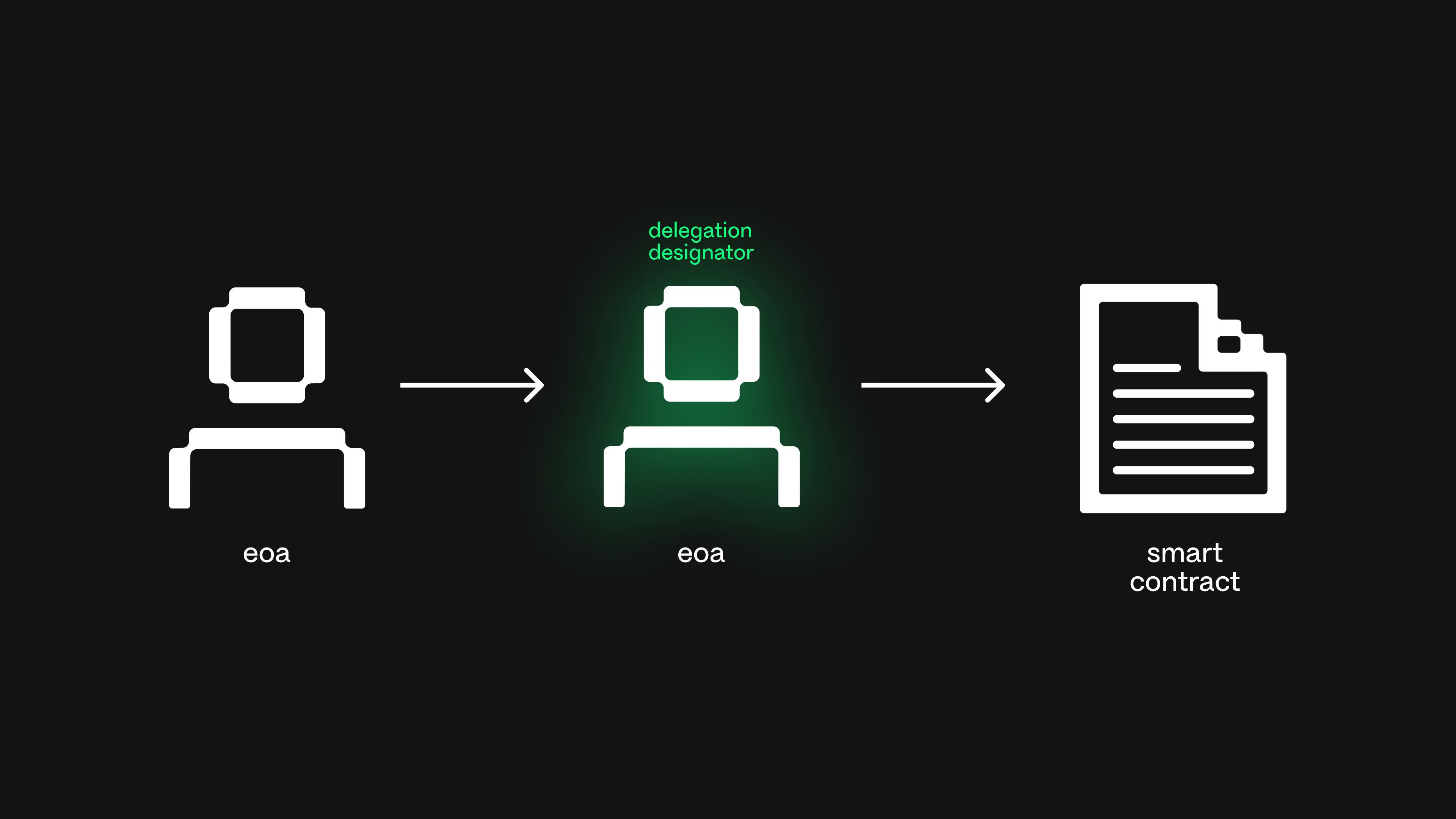
To enable an Externally Owned Account (EOA) to execute smart contract logic, you must generate and submit a special setCode transaction. EIP-7702 allows an EOA to temporarily delegate its execution rights to a smart contract. This process requires signing a specific authorization payload that binds the EOA to a target contract address.
The core mechanism involves creating a SetCodeAuthorization object. This object contains the target contract address, the nonce (to prevent replay attacks), and the chain ID. You then sign this authorization using the EOA's private key. The signature is included in the transaction's authorizationList field, allowing the EOA to act as if it were the target contract for the duration of the transaction or until revoked.
Identify the target smart contract address you wish to delegate to. Ensure you have a unique nonce for this delegation to prevent replay attacks. The nonce is an integer that increments with each new authorization from the same EOA. Record the current chain ID to ensure the authorization is only valid on the intended network.
Using a library like viem or ethers.js, construct the authorization payload. This payload must strictly follow the EIP-7702 specification. It includes the address of the target contract, the nonce, and the chainId. Do not include the signature yet; this object represents the data to be signed.
Use the EOA's private key to sign the SetCodeAuthorization object. The signing must use the EIP-7702 specific signature type. This step binds the EOA's identity to the target contract. The resulting signature is a standard ECDSA signature over the EIP-712 typed data or the raw hash, depending on the library implementation.
Include the signed authorization in the authorizationList field of your transaction payload. Send this transaction to the network. Once mined, the EOA is now delegated to the target contract. Any subsequent transactions from this EOA will execute the logic defined in the delegated contract until the delegation is revoked or expired.
Verify the signature on the target contract if it validates setCode calls. Ensure the nonce is managed carefully, as using the same nonce twice will result in a revert. Test this flow on a testnet before deploying to mainnet to avoid losing control of the EOA.
Test smart contract compatibility
Before enabling EIP-7702 for your user base, you must verify that existing smart contracts correctly interpret transactions from delegated EOAs. The primary risk is state corruption or unexpected reverting if a contract fails to recognize the temporary code execution context. Because EIP-7702 allows an EOA to temporarily act as a smart contract, any contract that performs strict validation on tx.origin or assumes the caller is a pure EOA may break.
Start by running your standard test suite against the target network. Focus on interactions that involve delegation setup, transaction batching, or gas sponsorship. If your contracts use extcodesize or similar opcodes to distinguish between EOAs and contracts, ensure they account for the transient state of a 7702-delegated account. Most legacy contracts will treat a delegated EOA as a contract during execution, which can trigger security checks designed to prevent contract wallet interactions.
Compare EOA vs. Delegated EOA Behavior
The table below outlines how common dApp interactions differ between a standard EOA and an EIP-7702 delegated EOA. Use this to identify potential failure points in your contract logic.
| Feature | Standard EOA | EIP-7702 Delegated EOA |
|---|---|---|
| tx.origin | Returns the EOA address | Returns the EOA address (unchanged) |
| msg.sender | Returns the EOA address | Returns the delegated contract address during execution |
| extcodesize(msg.sender) | Returns 0 | Returns >0 during execution |
| Self-destruct | Not applicable | Not applicable (EOA cannot self-destruct) |
| State Persistence | Direct storage changes | Storage changes handled by delegated contract |
Validation Checklist
- Run unit tests with
tx.originchecks: Ensure contracts that restrict access totx.originstill function when the caller is delegated. - Test
extcodesizelogic: Verify that contracts rejecting callers with code do not block delegated EOAs. - Verify gas estimation: Confirm that gas limits are correctly calculated for delegated transactions, as the execution context is more complex.
- Check for reentrancy risks: Ensure that delegation does not introduce new reentrancy vectors, especially if the delegated contract calls back into the user's contract.
If your tests pass, your contracts are compatible. If they fail, you may need to update your contract logic to explicitly handle delegated EOAs or restrict EIP-7702 usage to specific, tested functions.
Deploy and monitor the migration
With EIP-7702 enabled by default on supported networks, the deployment phase shifts from infrastructure configuration to user-facing transaction management. Your primary task is to execute the migration strategy while maintaining strict visibility over gas usage and transaction states. This section outlines the ordered steps for deploying the upgrade and monitoring for anomalies.
Ensure all client libraries (e.g., ethers.js, viem, web3.js) are updated to versions that support the new EIP7702 transaction type. For dApps, verify that the provider correctly formats initCode and authorizationList fields. Test against a testnet node first to confirm compatibility before touching mainnet balances.
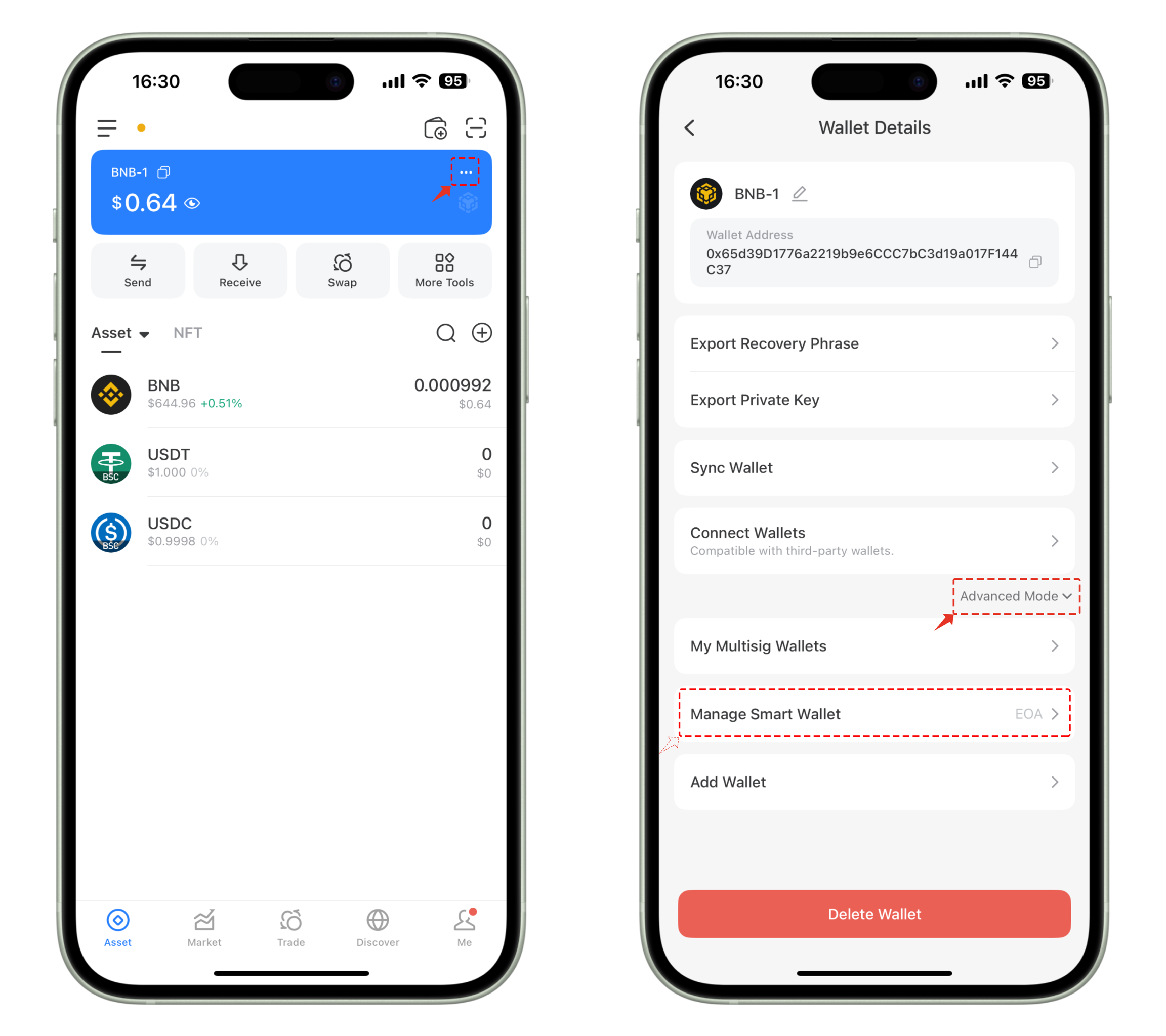
The first on-chain action for any EOA adopting EIP-7702 is signing an authorization message. This transaction delegates execution rights to a smart wallet contract. Users must sign this message using their existing private keys; no new contract deployment is required for the user address itself. Verify the transaction receipt confirms the setCode operation.
After the authorization transaction is mined, verify that the target contract code has been successfully attached to the EOA. You can do this by querying the account's code hash on-chain. If the code hash remains unchanged from a standard EOA, the delegation failed, and you must retry the authorization with correct gas limits.
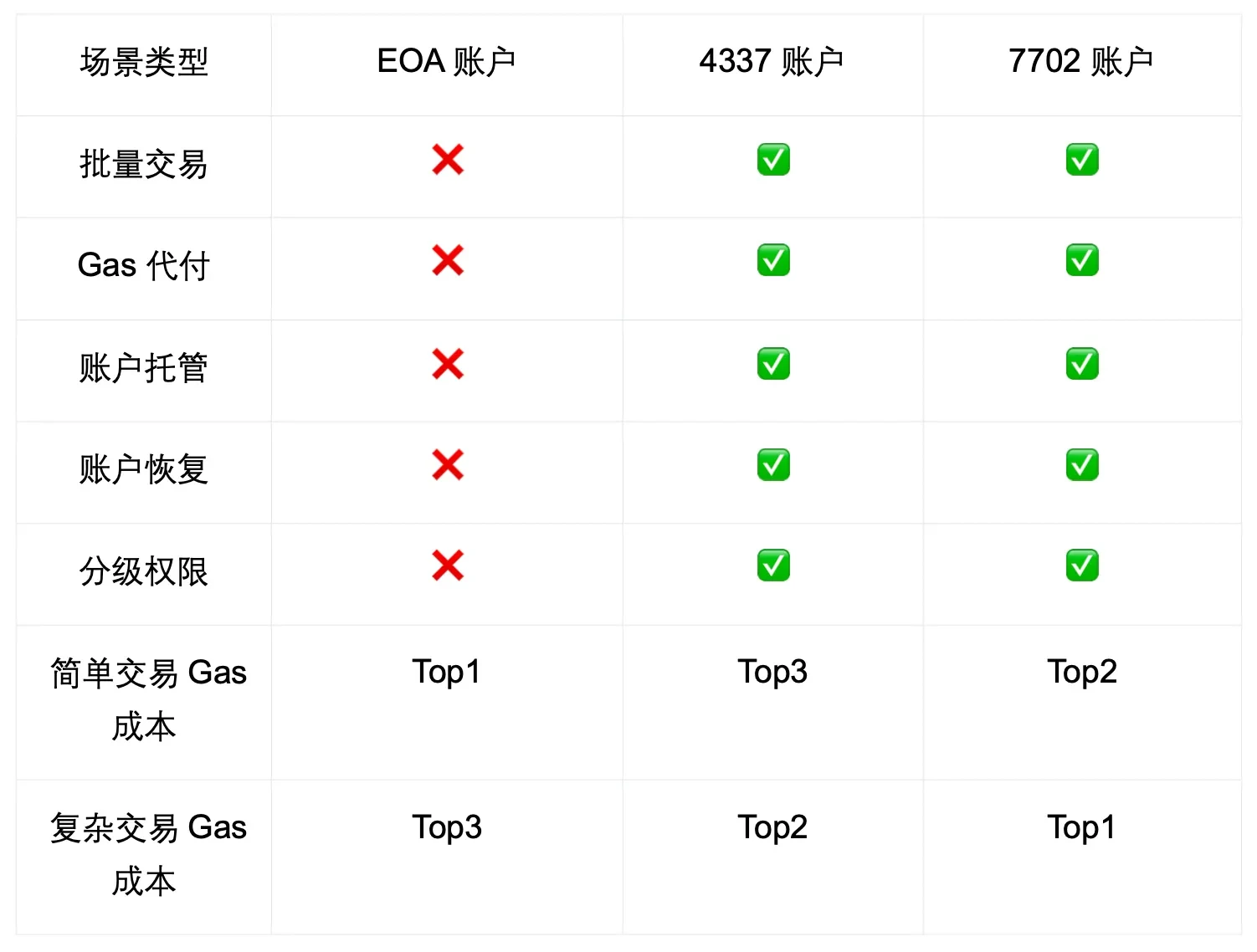
EIP-7702 transactions can consume more gas than standard transfers due to the code verification overhead. Monitor gas prices closely during peak hours. If gas spikes unexpectedly, check if the node is re-executing the authorization logic on every transaction. Adjust gas limits in your dApp's configuration to account for this variance.
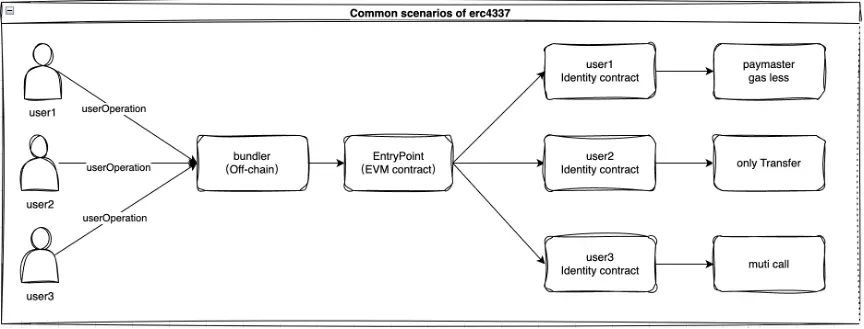
Run full user journeys: login, token swap, and NFT transfer. Ensure that the smart wallet contract correctly intercepts and executes these calls. Pay special attention to batched transactions; EIP-7702 enables complex batching, but improper handling can lead to partial failures. Log any failed UserOperations for debugging.
No comments yet. Be the first to share your thoughts!