
What EIP-7702 changes for your wallet
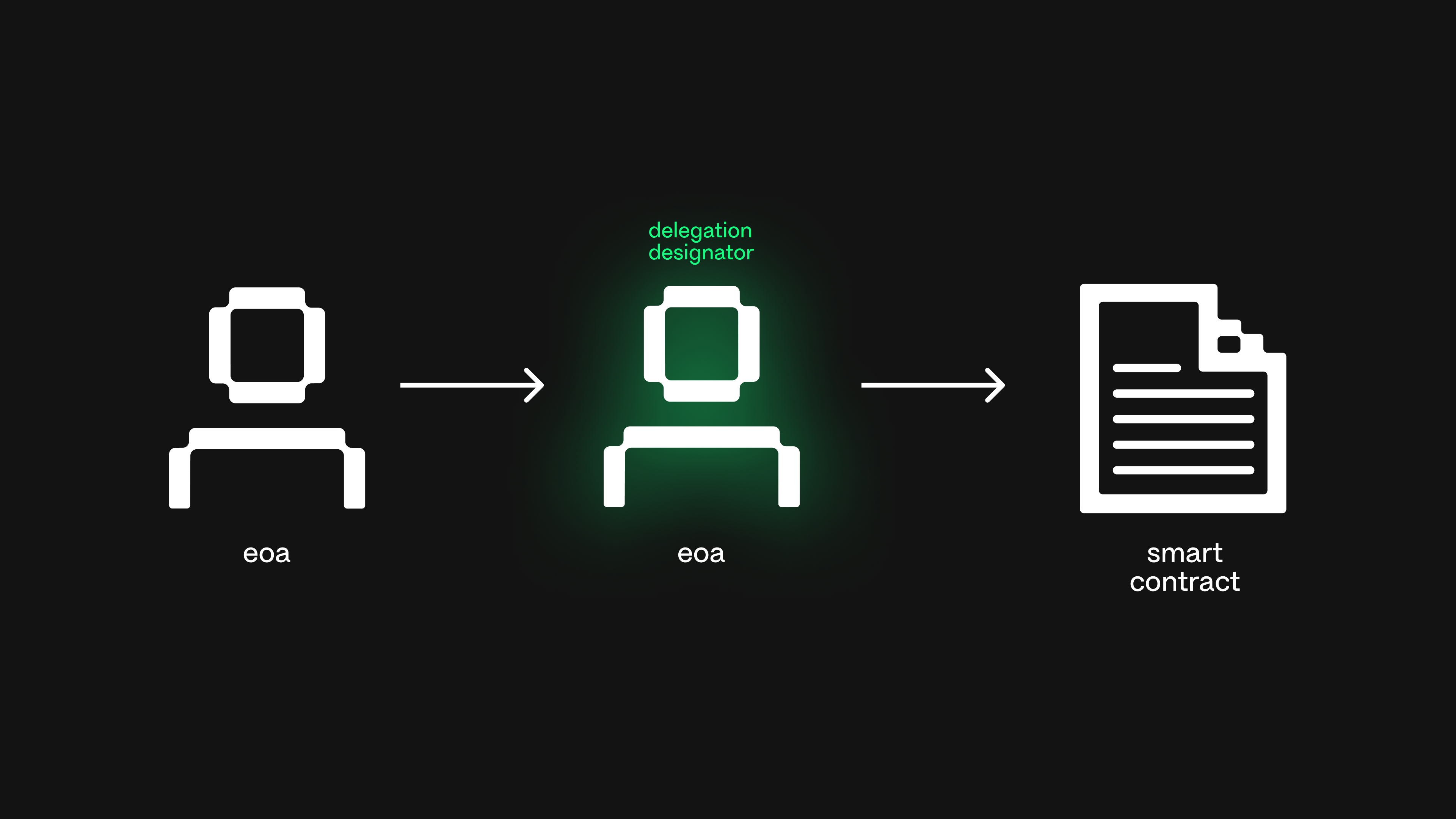
EIP-7702 is a protocol upgrade that allows your standard Ethereum wallet to temporarily borrow smart contract capabilities. This means you can use features like gas sponsorship, transaction batching, and session keys without changing your address or deploying a new smart contract wallet.
Think of this as a temporary delegation rather than a permanent migration. Your Externally Owned Account (EOA) remains the same, but it can now sign and execute code from a smart contract. This bridges the gap between simple key-based wallets and advanced account abstraction.
This upgrade is already enabled by default on many networks, giving you immediate access to safer and more efficient transaction methods. You retain full control over your private keys while benefiting from the flexibility of smart contract logic.
Check wallet and dapp compatibility
Before initiating the EIP-7702 migration 2026, you must verify that your wallet infrastructure supports Pectra. This upgrade allows EOAs to temporarily adopt smart contract logic, but not all wallets can handle the new signature types yet. If your wallet doesn't support EIP-7702, you won't be able to sign the required authorization transactions, and the migration will fail.
Verify Your Wallet
Check if your primary wallet (e.g., MetaMask, Rabby, or a hardware wallet) has explicitly enabled EIP-7702 support. Many wallets require a manual toggle or a recent update to recognize the new type-4 transactions. If you use a smart account provider like Safe or Web3Auth, confirm that their backend infrastructure is ready for the Pectra fork. You can check compatibility lists on sites like WalletBeat.
Test with a Small Transaction
Once you believe your wallet is compatible, test the setup with a small, non-critical transaction. Attempt to sign a message or execute a simple interaction that utilizes EIP-7702 features, such as gasless transfers or batching. If the transaction reverts or the wallet UI doesn't prompt for the new signature type, your wallet is not yet ready.
Check Dapp Support
Even if your wallet works, the dapp you're interacting with must also support EIP-7702. Some frontends still expect traditional EOAs or older ERC-4337 implementations. Look for dapps that explicitly mention Pectra or EIP-7702 support in their documentation. If a dapp doesn't support it, you may need to use a wrapper or wait for an update.
Initiate the EOA delegation transaction
To complete the EIP-7702 migration 2026 process, you must sign a specific TYPE-4 transaction. This transaction is the bridge that links your existing Externally Owned Account (EOA) to a smart contract wallet. Unlike standard transfers, this action does not move funds; it updates the account's code pointer to authorize the smart contract to execute transactions on your behalf.
1. Select a Compatible Smart Contract Wallet
Before signing, ensure your chosen wallet supports EIP-7702. Popular options like Safe and various embedded wallets have integrated this standard. Verify that the wallet provider explicitly lists EIP-7702 support in their documentation. Attempting to delegate to an unsupported contract will result in a transaction revert or unexpected behavior.
2. Prepare the TYPE-4 Transaction
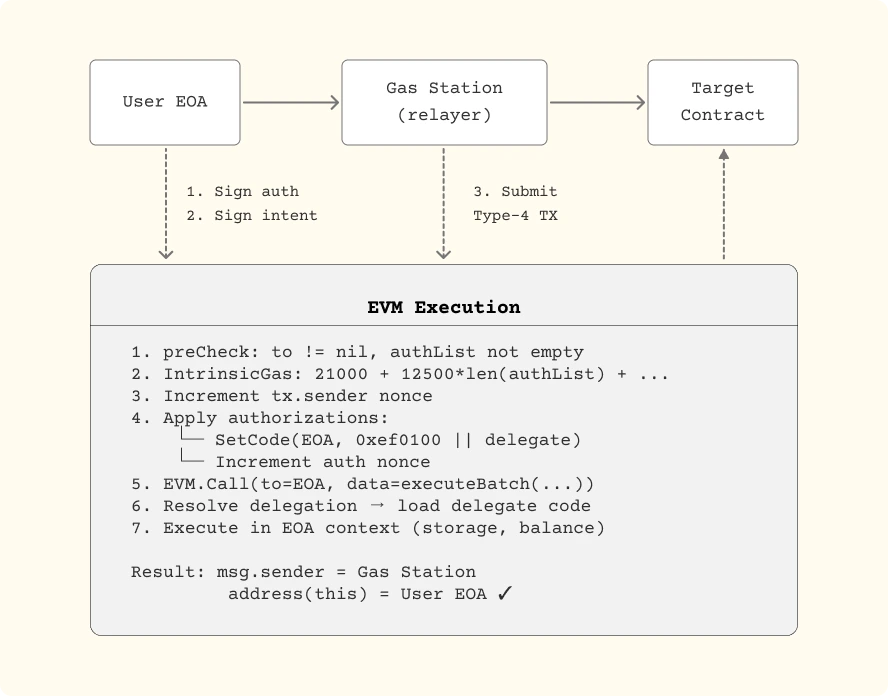
The core of the migration is the TYPE-4 transaction. This transaction type includes a code_hash or authorization_list that references the smart contract's address. When you initiate this transaction from your EOA wallet (such as MetaMask or Rabby), the wallet will prompt you to sign a message that authorizes the delegation. Ensure you are signing from the correct EOA address that holds the assets you wish to manage.
3. Sign and Submit the Transaction
Once the transaction details are verified, sign the TYPE-4 transaction. This signature is critical—it proves you own the EOA and intend to delegate its execution rights. Submit the transaction to the Ethereum network. The network will validate the signature and, if successful, update the account state to reflect the new smart contract code association.
4. Verify Delegation On-Chain
After the transaction is confirmed, verify the delegation. You can check the transaction receipt on a block explorer to ensure the status is successful. Additionally, test the new setup by initiating a small transaction through the smart contract wallet to confirm that the delegation is active and functioning as expected.
Confirm your wallet supports EIP-7702. Not all wallets have enabled this feature by default. Check the provider's documentation for explicit support to avoid failed delegations.
Initiate the delegation from your EOA. The transaction will include an authorization list pointing to the smart contract. Review the code_hash carefully to ensure it matches your target wallet.
Sign the TYPE-4 transaction with your EOA private key. This signature authorizes the smart contract to act on your behalf. Submit the transaction to the Ethereum network and wait for confirmation.
Check the transaction receipt on a block explorer. Confirm the status is successful. Test the new setup with a small transaction to ensure the smart contract wallet is now active.
-
Verify wallet compatibility with EIP-7702
-
Confirm the correct EOA address is selected
-
Review the authorization list in the TYPE-4 transaction
-
Sign and submit the delegation transaction
-
Test the smart contract wallet with a small transaction
Configure session keys and gas sponsorship
The EIP-7702 migration 2026 allows you to attach smart contract logic to your standard wallet address without deploying a new contract. This enables two powerful features: paying gas with tokens other than ETH and limiting dApp permissions to specific time windows.
Set up gasless USDC transactions
EIP-7702 enables EOAs to delegate execution to a smart wallet contract, allowing third parties to pay transaction fees. Circle has integrated this into the Pectra Upgrade, letting users send USDC with gas sponsored by the network or a dApp.
To use this, your wallet must support EIP-7702 delegation. When initiating a USDC transfer, select the "Sponsored Gas" option if available. The dApp signs a separate transaction covering the gas cost, while your EOA handles the asset transfer.
Create limited-time session keys
Session keys provide a safer alternative to granting permanent approval. Instead of giving a dApp unlimited access to your funds, you can create a key that expires after a set time or transaction count.
- Open your EIP-7702-compatible wallet.
- Navigate to the "Session Keys" or "Delegation" settings.
- Select the target dApp contract.
- Set an expiration time (e.g., 24 hours) or a transaction limit.
- Confirm the delegation transaction.
The dApp can now execute actions on your behalf within those constraints. Once the time expires, the permission automatically revokes, returning your EOA to its standard state.
Compare delegation options
Standard EOAs and EIP-7702 delegated accounts differ significantly in how they handle fees and permissions.
| Feature | Standard EOA | EIP-7702 Delegated | Security Impact |
|---|---|---|---|
| Gas Payment | ETH only | ETH or ERC-20 tokens | Neutral |
| Permission Scope | User signs every tx | Delegated to contract | Reduced risk via limits |
| Session Duration | Per-transaction | Configurable (time/count) | Higher with expiration |
| Setup Cost | None | One-time delegation tx | Initial exposure |
Revoke delegation when finished
Once your specific task is complete, you must revoke the EIP-7702 delegation to restore your EOA to its original state. Leaving a delegation active is a security risk; it keeps smart contract code associated with your address, allowing the sponsor to potentially execute transactions on your behalf indefinitely.
To revoke the delegation, you must send a new transaction from your EOA that includes a fresh SET_CODE_HASH authorization with an empty code_hash (typically 0x0000...). This action effectively undoes the previous delegation, removing the smart contract logic from your account. This process is explicit and requires a standard transaction from the EOA, ensuring you maintain full control over when the abstraction ends.
After the transaction confirms, your EOA returns to its pre-EIP-7702 status. No smart contract code remains linked to the address, and the sponsor loses any ability to interact with your account through the delegation mechanism. Always verify the revocation on a block explorer to ensure the code_hash is cleared before considering the migration complete.
Common mistakes during EIP-7702 setup
The transition to EIP-7702 migration 2026 introduces new transaction types that behave differently from standard transfers. Misunderstanding these mechanics can lead to irreversible fund loss or locked accounts. Follow this sequence to avoid the most frequent pitfalls.
Signing invalid TYPE-4 transactions
EIP-7702 relies on TYPE-4 transactions to delegate execution rights. If you sign a transaction with the wrong type or invalid signature data, the network will reject it, or worse, execute unintended logic. Always verify that your wallet supports TYPE-4 encoding before initiating delegation. Using an unsupported wallet can lock funds because the EOA cannot revert the delegation without the correct smart contract interaction.
Failing to revoke delegation
Delegation is not always permanent. If you delegate to a compromised or outdated smart contract, you remain liable for any malicious execution until you revoke the authorization. Check the EIP-7702 spec for the correct revocation transaction format. Many users forget to revoke old delegations when switching wallets, leaving their address vulnerable.
Using unsupported wallets
Not all wallets handle EIP-7702 features consistently. Some may display the delegation as a standard transfer, hiding the fact that your EOA now executes code. This opacity increases the risk of signing malicious payloads. Stick to wallets that explicitly advertise EIP-7702 compatibility and provide clear transaction previews.
No comments yet. Be the first to share your thoughts!