
Why migrate your EOA now
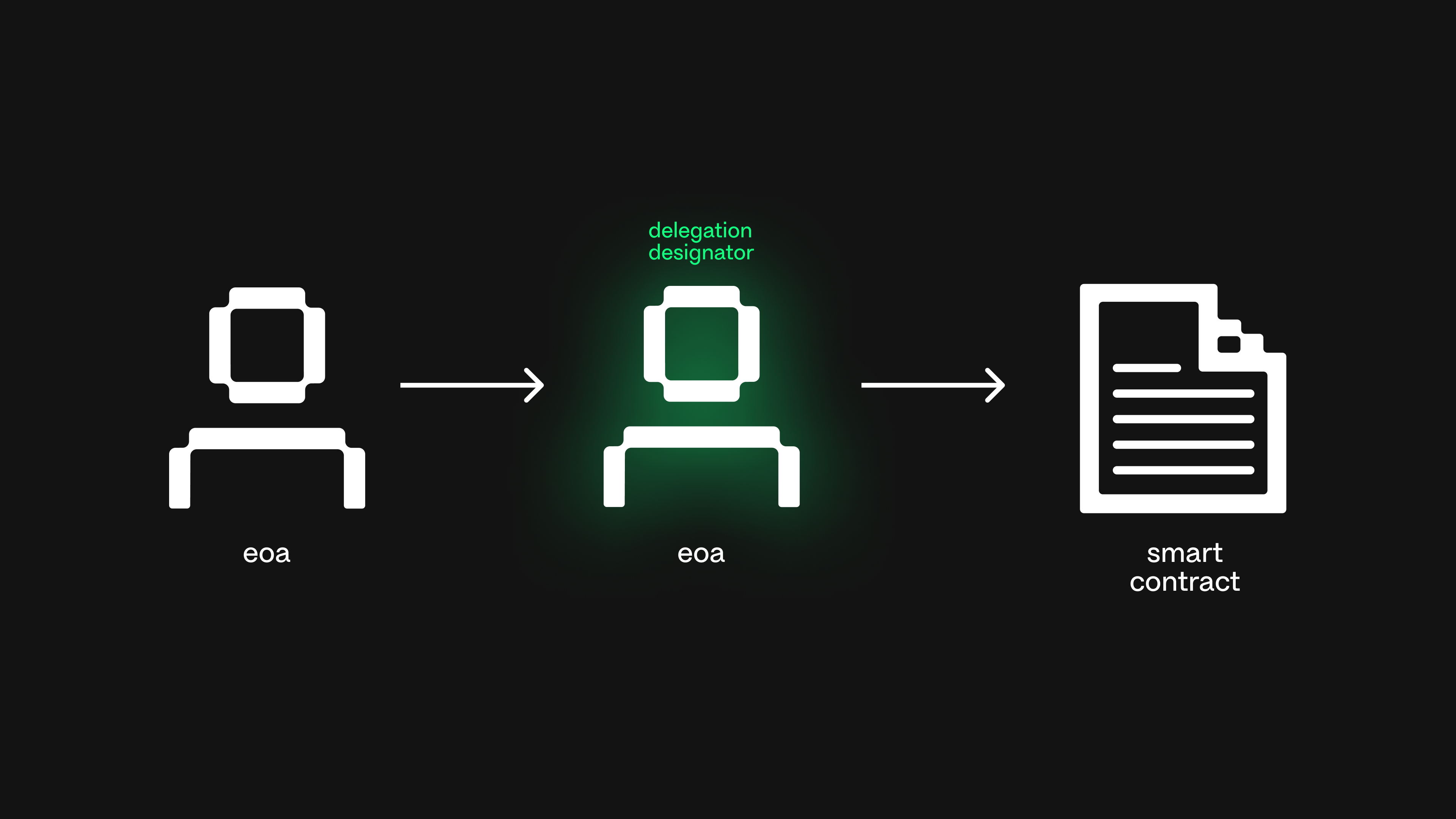
Ethereum’s Pectra upgrade enabled EIP-7702, allowing Externally Owned Accounts (EOAs) to temporarily delegate execution to smart contracts. This means your existing wallet address can now access smart wallet features like gas sponsorship, transaction batching, and session keys without deploying a new contract or changing your address.
This capability removes the traditional friction of migrating to a smart wallet. Previously, moving to a smart account required transferring all assets to a newly deployed contract—a process that risks user error and breaks address continuity. With EIP-7702, you can activate these features on demand. Your EOA retains its simplicity and history while gaining the programmability of a smart contract.
The urgency to adopt this feature now stems from growing ecosystem support. Major protocols are beginning to offer gasless transactions and sponsored fees specifically for EIP-7702-enabled accounts. For example, Circle now supports gasless USDC transactions using this standard, reducing costs for users who might otherwise pay high gas fees for small transfers. As more dApps integrate this standard, staying on a plain EOA means missing out on cheaper, faster, and more secure interactions.
Unlike EIP-4337, which relies on separate smart-account contracts and a dedicated mempool, EIP-7702 works directly with your existing EOA. The two standards are not mutually exclusive, but EIP-7702 offers a simpler entry point for users who want smart wallet capabilities without the complexity of contract deployment. By leveraging this upgrade, you can future-proof your wallet against rising gas costs and improve security through session keys, all while keeping the same address you’ve used for years.
Prepare your wallet for delegation
Before initiating the EIP-7702 migration, you must verify that your current setup can handle contract delegation. This process allows your Externally Owned Account (EOA) to temporarily delegate execution to a smart contract, effectively turning it into a smart wallet without changing your address. If your wallet software does not support the new signature format, the delegation transaction will fail.
Open your wallet’s settings or update history. Look for explicit mentions of EIP-7702, contract delegation, or smart account compatibility. If your wallet is outdated, update it to the latest version. Major providers like MetaMask and Rabby have integrated support for these signatures. If your wallet lacks support, you cannot proceed with the delegation from this device.
Choose a smart wallet provider that supports EIP-7702 delegation. Popular options include Biconomy, Safe, and Alchemy. Review their documentation to ensure they support the specific features you need, such as gas sponsorship or multi-sig functionality. Remember that EIP-7702 is distinct from EIP-4337; the former delegates your existing EOA, while the latter deploys a separate account. Ensure your chosen provider aligns with this delegation model.
If you have previously delegated your EOA to any smart contracts, verify that those contracts are compatible with EIP-7702. According to the EIP specification, if all previously delegated contracts use the standard approach, migration should proceed without issue. However, if you have interacted with custom or outdated contract logic, test the delegation on a small amount of funds first to avoid locking your assets.
Once you have confirmed your wallet’s compatibility and selected a provider, you are ready to generate the delegation signature. This step is critical because the signature binds your EOA to the smart contract’s code. Without proper verification, you risk interacting with incompatible contracts or exposing your keys to unnecessary risk.
Execute the delegation transaction
The core action of EIP-7702 migration is a single transaction that delegates your EOA’s execution rights to a smart contract. This transaction sets the code_hash in your account’s storage, effectively authorizing a smart wallet to sign transactions on your behalf. Once deployed, your EOA address remains unchanged, but it now carries the capability to execute smart contract logic.
You must construct this transaction carefully to ensure the smart wallet can correctly interpret the delegation. The transaction must include the init_code of the smart wallet contract in the code_hash field. This allows the Ethereum Virtual Machine (EVM) to verify the contract’s integrity when validating future delegated transactions.
Follow these steps to construct and send the delegation transaction securely.

Identify the smart wallet contract you intend to use. Ensure it is compatible with EIP-7702 and has been deployed on the target network. You will need the contract’s address and its bytecode to construct the delegation transaction. Verify the contract’s security audit status before proceeding, as this transaction grants significant control to the contract.
Use your wallet interface or a library like ethers.js to create a transaction. Set the to field to your own EOA address. In the data field, include the function call to set the code_hash. This typically involves calling a specific function on your EOA, such as set_code_hash, passing the smart wallet’s contract address or bytecode hash as the argument. Ensure the transaction is signed with your EOA’s private key.
Double-check all parameters before signing. Confirm that the code_hash matches the smart wallet contract you intend to delegate to. Verify the gas limit is sufficient to cover the storage write operation. If you are using a wallet interface, ensure it supports EIP-7702 transactions and displays the correct delegation details. Any mismatch in the code_hash will result in a failed delegation or an inability to use the smart wallet.
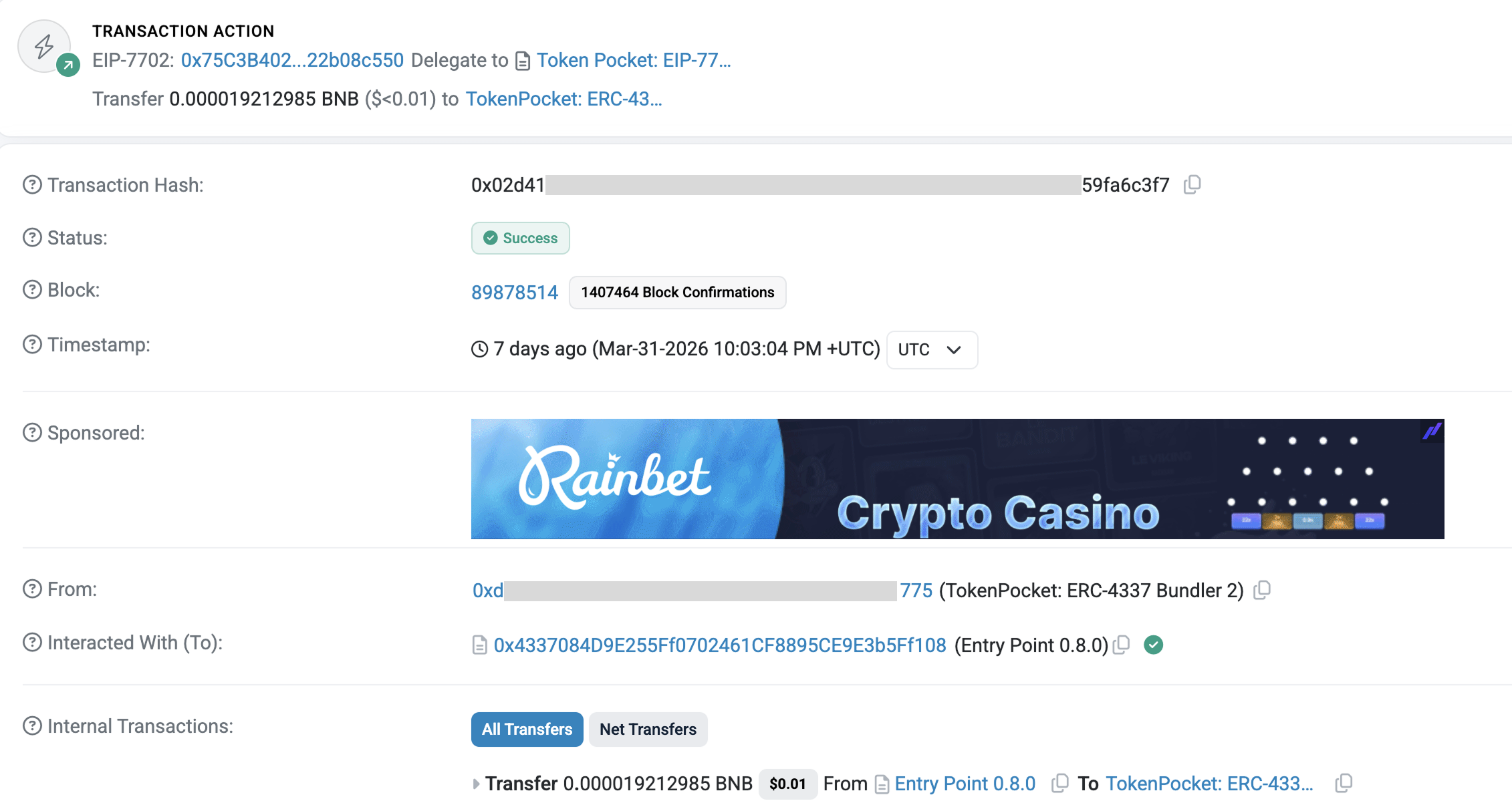
Sign the transaction with your EOA’s private key and broadcast it to the Ethereum network. Wait for the transaction to be confirmed on-chain. Once confirmed, your EOA is now delegated to the smart wallet. You can verify the delegation by checking your account’s storage or using a block explorer to view the code_hash associated with your address.
After the delegation is confirmed, test the smart wallet by signing a transaction using the smart wallet’s signing mechanism. This ensures that the delegation is working correctly and that the smart wallet can execute transactions on your behalf. Start with a small test transaction to verify the entire flow before migrating your full balance.
Compare EIP-7702 and ERC-4337
Choosing the right smart wallet path depends on whether you want to upgrade your existing address or start fresh. EIP-7702 and ERC-4337 offer different architectural approaches to account abstraction, each with distinct trade-offs for migration.
EIP-7702 allows an existing externally owned account (EOA) to temporarily delegate execution to a smart contract. This means you can access smart wallet features like gas sponsorship and transaction batching without changing your address or deploying a new contract. It is a lightweight upgrade that keeps your familiar interface while adding smart capabilities.
ERC-4337, by contrast, requires deploying a separate smart-account contract that holds your funds. This new account processes transactions through a dedicated mempool, offering more robust features but requiring you to migrate your assets to a new address. It is a more permanent structural change rather than a temporary delegation.
The two standards are not mutually exclusive. You can use EIP-7702 for quick upgrades to existing EOAs or ERC-4337 for a full smart account deployment. Choose based on whether you prioritize address continuity or feature depth.
| Feature | EIP-7702 | ERC-4337 |
|---|---|---|
| Account Type | Existing EOA | New Contract Account |
| Address Change | None | New Address |
| Deployment | No Contract Deploy | Requires Deployment |
| Gas Sponsorship | Yes | Yes |
| Complex Logic | Limited | Full Flexibility |
Avoid common delegation mistakes
Migrating an EOA to a smart wallet via EIP-7702 introduces new attack surfaces. While the mechanism is secure by design, implementation errors can lead to permanent fund loss. Focus on three specific pitfalls: unauthorized delegation, incorrect contract addresses, and gas estimation failures.
Prevent unauthorized delegation
The core risk of EIP-7702 is that it allows an EOA to temporarily delegate execution rights to a smart contract. If you delegate to a malicious or compromised contract, that contract gains full control over your funds for the duration of the session.
Always verify the contract address before signing the delegation transaction. Use official sources like CoW DAO or Nethermind to audit the target contract's code. Never delegate to addresses found in unsolicited messages or unverified third-party links. Treat the delegation signature as a temporary key transfer, not a permanent handover.
Verify contract addresses
A single character error in the contract address can send your delegation rights to a dead address or a honeypot. This is especially dangerous because the delegation is tied to your existing EOA address. If you make a mistake, you may lock your funds or expose them to unintended logic.
Double-check the target contract address against the official documentation of the wallet provider you are using. Many wallets provide a direct link to their verified contract on block explorers like Etherscan. Copy and paste the address rather than typing it manually. Confirm that the contract is deployed on the correct network (e.g., Ethereum Mainnet vs. a testnet).
Account for gas estimation errors
EIP-7702 transactions involve complex signature verification and code execution, which can lead to unpredictable gas usage. Standard gas estimation tools may underestimate the required gas, causing transactions to fail or be reaped by miners with insufficient funds.
Always add a buffer to your gas limit. If a transaction estimates 200,000 gas, set your limit to at least 250,000. Use wallets that support dynamic gas estimation specifically designed for EIP-7702. Check the Nethermind blog for detailed analysis on gas consumption patterns in EIP-7702 attack surfaces to ensure you are not underestimating costs.
-
Verify the target smart contract address against official sources
-
Confirm the contract is deployed on the correct network
-
Add a 20-25% buffer to estimated gas limits
-
Test the delegation with a small amount of funds first
No comments yet. Be the first to share your thoughts!