
What EIP-7702 changes for your wallet
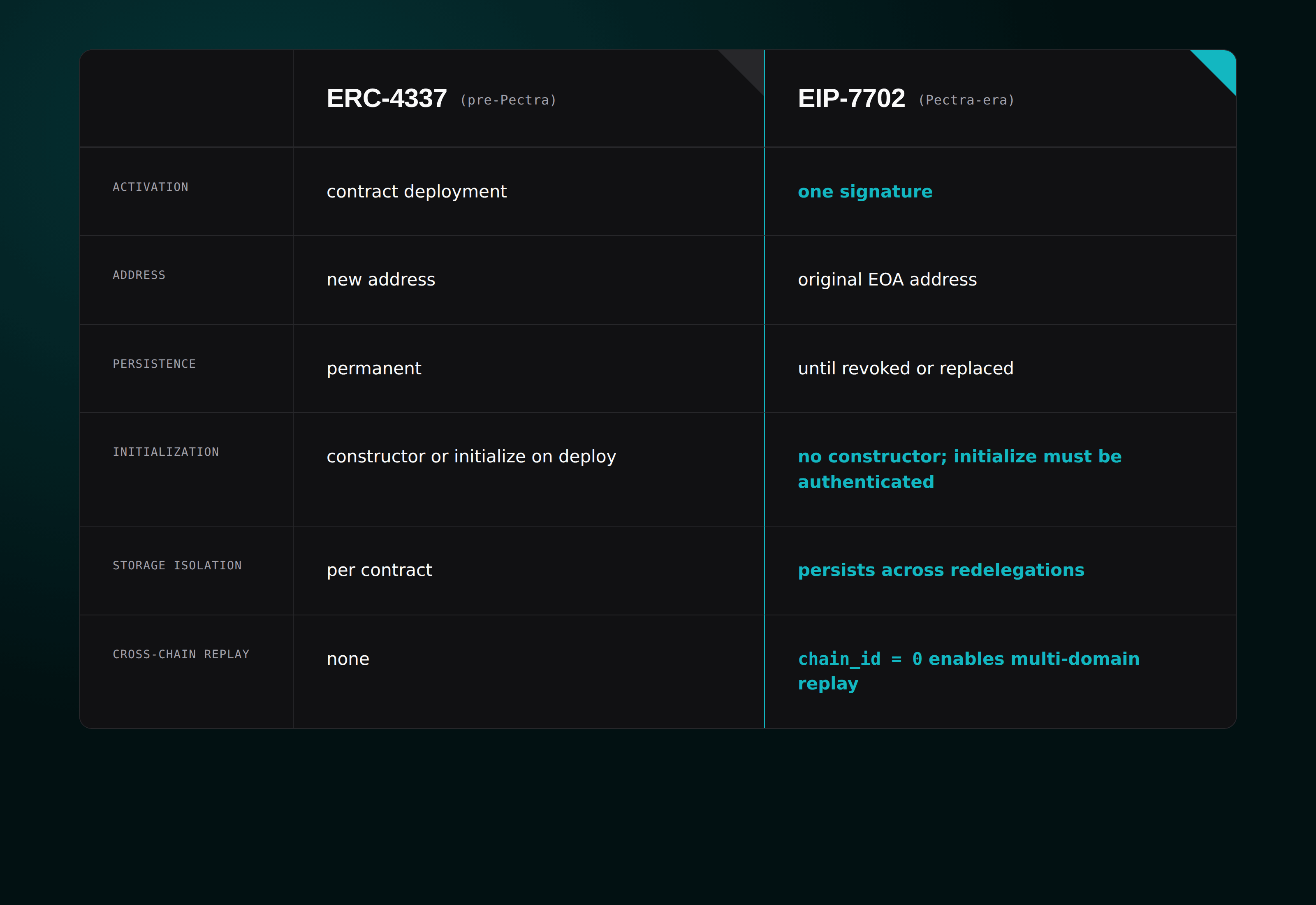
EIP-7702 removes the need for a new wallet address. Instead of migrating to a complex smart contract account, you can keep your existing EOA and opt into smart account features. This upgrade allows EOAs to delegate execution to a smart contract, giving you the benefits of account abstraction without abandoning your current setup.
Before this change, EOAs were limited to simple transaction signing. They could not store state or execute complex logic. EIP-7702 bridges this gap by allowing your EOA to temporarily impersonate a smart contract. This means you can use features like paymasters, session keys, and batched transactions directly from your standard wallet address.
The process is opt-in. You do not need to send your funds to a new contract or change your backup phrases. Your EOA remains the same, but its capabilities expand to include code execution and storage. This approach keeps your security model familiar while unlocking the advanced functionality previously reserved for smart wallets.
For detailed technical specifications, see the EIP-7702 documentation. Wallet providers are currently integrating support for this feature. Check your wallet’s official channel for updates on when EIP-7702 becomes available for your specific interface.
Check if your wallet supports EIP-7702
Before attempting to delegate your Externally Owned Account (EOA) to a smart contract, you must verify that your wallet provider has enabled EIP-7702 support. This upgrade is not universal; implementation varies significantly across providers and network configurations. Using an unsupported wallet will result in transaction failures or silent drops.
Start by checking your wallet’s official documentation or release notes for the Pectra upgrade. Major providers like MetaMask, Safe, and Rabby have rolled out support at different paces. For the most accurate, real-time status, consult the Alchemy EIP-7702 blog, which maintains a live compatibility tracker.
If your wallet is not yet updated, you can still interact with EIP-7702 features using a browser extension or a hardware wallet interface that supports custom transaction signing. However, native support is required for the smoothest experience, including automatic session key management and gas sponsorship.
| Wallet Provider | EIP-7702 Support Status | Notes |
|---|---|---|
| MetaMask | Supported | Requires latest version |
| Safe | Supported | Native integration in SafeWallet |
| Rabby | Supported | Early access features |
| Ledger Live | Limited | Requires external dApp interaction |
Always test with a small amount of ETH first. Verify that the transaction type is 0x04 (EIP-7702) in your block explorer before delegating significant assets.
Delegate your EOA to a smart contract
Enabling smart contract features on your Externally Owned Account (EOA) requires a specific delegation transaction. This process, defined by EIP-7702, temporarily binds your private key to a deployed smart contract code. Once delegated, your EOA executes logic defined by that contract while retaining full control of your assets.
The delegation is not permanent. It remains active until you revoke it or perform a transaction that clears the delegation state. This mechanism allows wallets and applications to implement advanced features like social recovery or spending limits without forcing users to migrate to complex account abstraction models.
To begin, you must have a compatible EOA wallet. Most standard wallets do not yet support EIP-7702 natively. You will likely need to use a specialized wallet interface or a decentralized application (dApp) that explicitly supports the new transaction type. The following steps outline the standard workflow for initiating this delegation.
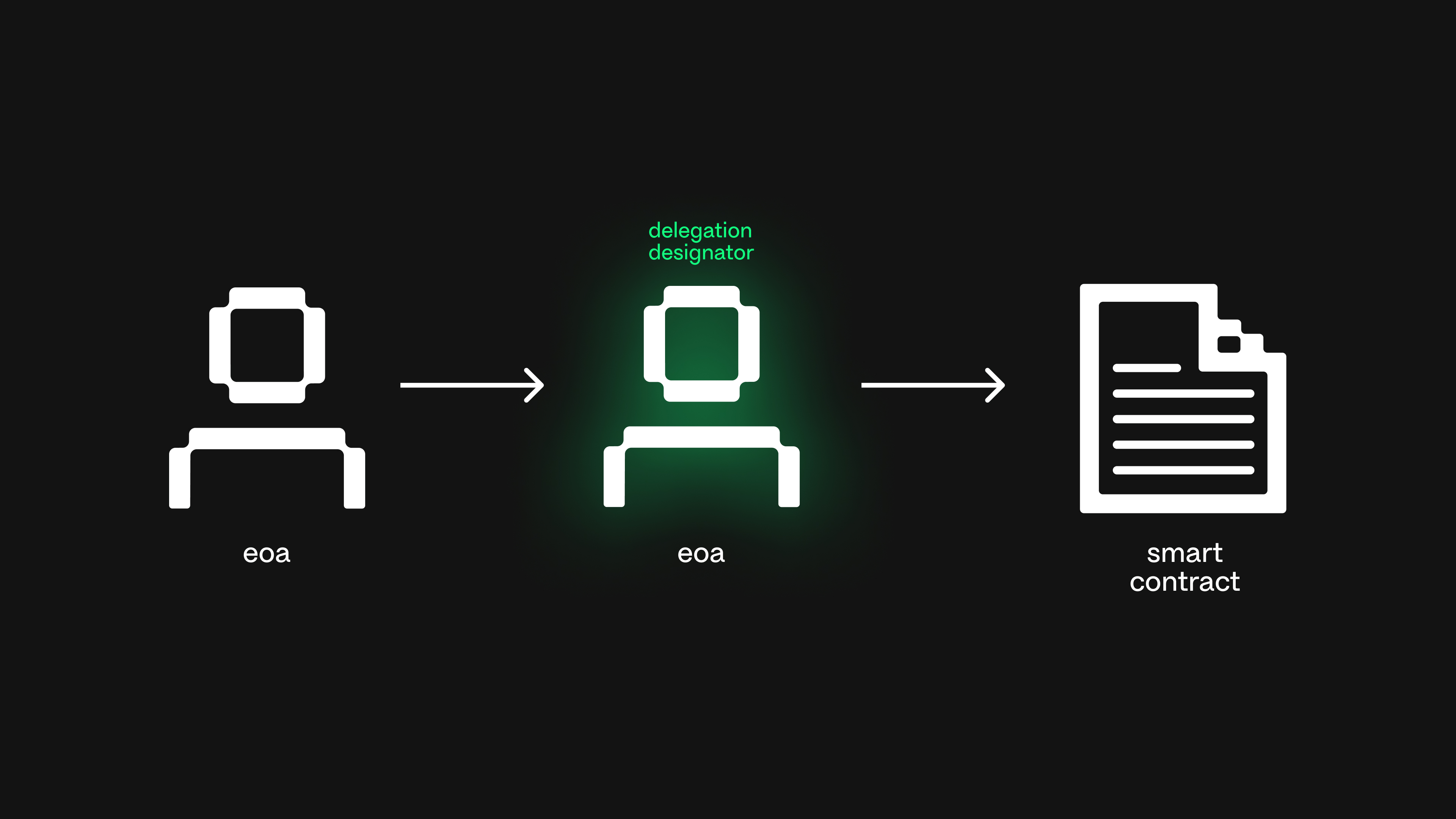
Before signing any transaction, you must have the address of the smart contract you wish to delegate to. This contract must be EIP-7702 compliant. Verify the contract address on a block explorer to ensure it is legitimate and has been audited if possible. Do not delegate to unverified contracts, as they may contain malicious logic that exploits your delegated authority.
Open your compatible wallet or dApp interface and navigate to the EIP-7702 delegation feature. This is often labeled as "Set Code" or "Delegate." Enter the target contract address into the designated field. The interface should construct a new EIP-2718 transaction type specifically for this purpose. Ensure the gas limit is set appropriately, as this transaction is typically simple but requires standard execution costs.
Carefully review the transaction preview. The key detail to verify is the codeHash or the contract address being linked to your EOA. This transaction does not transfer funds; it only updates the execution logic associated with your account. Confirm that the contract address matches your intended target. Mistakes here can lead to permanent or hard-to-revoke delegation if the contract is not designed for easy revocation.
Approve and sign the transaction using your wallet's private key. This signature proves you own the EOA and authorize the binding of the smart contract code. Once signed, broadcast the transaction to the network. Wait for confirmation on the blockchain. You can verify the delegation by checking the account's state on a block explorer; the codeHash field should now reflect the target contract.
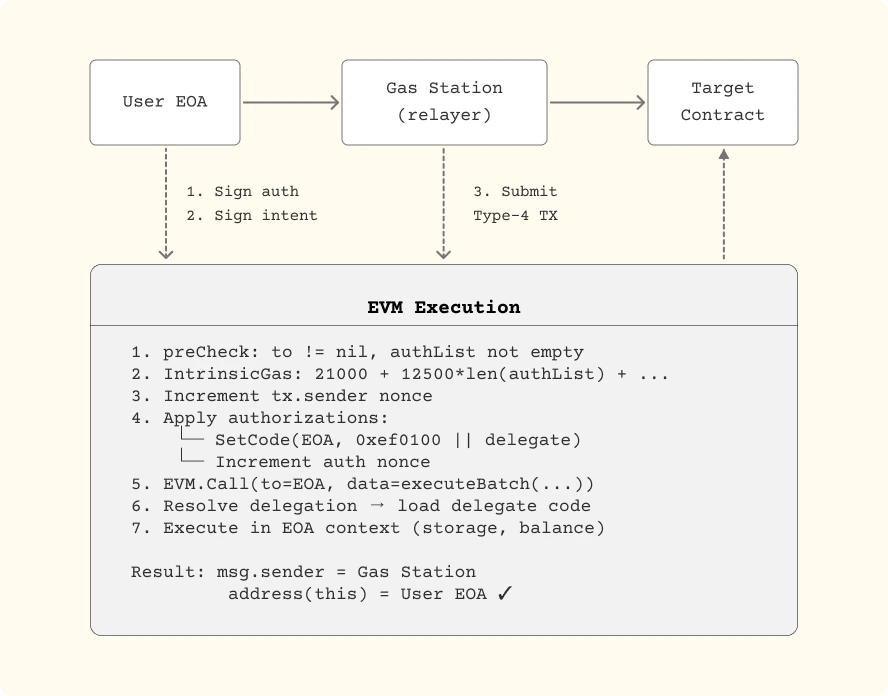
After the transaction is confirmed, test the new capabilities. Try interacting with a dApp that relies on the delegated contract's logic. For example, if you delegated to a wallet with spending limits, attempt a transaction that exceeds those limits to see if it is blocked. This step ensures the delegation is active and functioning as expected before you rely on it for significant assets.
Fix common gas and signature errors
When enabling smart contract features on your EOA, the transaction will fail if the wallet cannot cover the execution costs or if the signature structure is malformed. These errors are the most common friction points during the EIP-7702 migration 2026 rollout.
Ensure sufficient gas for delegation
Setting up your account requires a specific transaction type (typed transaction) that carries a different gas cost than a standard ETH transfer. If you send too little gas, the node will reject the delegation before it even processes the signature.
Always set a gas limit that accounts for the extra computational overhead of the contract authorization. Using the default gas estimate provided by your wallet is usually safe, but manually increasing the limit by 20% can prevent "out of gas" failures during peak network congestion. Verify that your EOA holds enough native currency to cover both the transaction fee and any immediate state changes the contract might trigger.
Validate signature format and structure
EIP-7702 relies on a specific signature format to authorize the delegation. If the signature is not properly encoded, the node will treat the transaction as invalid. This often happens when wallets use an outdated signing standard or fail to include the necessary chain ID and nonce data.
Check that your wallet supports the EIP-7702 specific signing scheme. If you are using a hardware wallet, ensure the firmware is updated to handle the new transaction type. A mismatch in the signature structure will result in a silent failure or a clear "invalid signature" error, requiring you to re-sign the delegation with the correct parameters.
Verify your delegation is active
After signing the authorization, the EIP-7702 migration 2026 process isn't complete until the network reflects the change. You need to confirm that your Externally Owned Account (EOA) now points to the smart contract code. This verification step ensures your sponsored transactions will route correctly and prevents failed gas payments or unexpected reverts.
Check the on-chain code hash
The most reliable method is to inspect the account state directly. Use a block explorer like Etherscan or a provider like Infura to query the code at your EOA address. If the delegation is active, the response will return the bytecode of the authorized smart contract rather than an empty string or the default EOA code.
For example, querying eth_getCode should return the contract hash. If it returns 0x, the transaction may still be pending, or the authorization was not included in the chain yet. Wait for the next block confirmation before proceeding.
Test with a sponsored transaction
A practical test is to execute a small, non-critical transaction that requires smart account logic. Send a minimal value transfer or interact with a simple contract function. If the EIP-7702 delegation is working, the transaction will succeed using the contract's logic, confirming that your EOA is now behaving as a smart account.
-
Verify `eth_getCode` returns non-empty bytecode
-
Confirm transaction succeeds with smart account logic
-
Check that gas fees are processed correctly
If the test transaction fails, double-check the signature and the nonce used in the authorization. Ensure the contract code matches exactly what you intended to deploy. For detailed guidance on EIP-7702 mechanics, refer to the SAFE documentation.
No comments yet. Be the first to share your thoughts!